Digital advertising
How much Google Ads costs: spend, management fees and a realistic budget
How much Google Ads costs: what you pay Google, what an agency charges to manage it and what budget you need for it to pay off.


Is your site slow, with visitors leaving before they even see your content? Core Web Vitals are the three metrics Google uses to measure your website’s user experience. If you do not optimise them, your search rankings can suffer badly.
These metrics do not only affect traditional organic rankings; they also affect how you show up in Google’s AI Overviews, where speed and user experience help decide whether your site is cited as a source.
In this guide we explain what Core Web Vitals are, what the three main metrics measure (LCP, INP and CLS), how to measure them with free tools and what to do to improve them. Practical information from our website maintenance service in Barcelona, where we optimise sites to meet every Google standard.
Core Web Vitals are a set of three metrics created by Google to measure user experience on web pages. They assess fundamentals such as loading speed, responsiveness to interaction and the visual stability of the content.
Google announced in 2020 that these metrics would form part of its ranking algorithm, and since 2021 they have been an official ranking factor. That means two pages with similar content can rank differently depending on their Core Web Vitals scores.
The three metrics that make up Core Web Vitals are:
It is worth noting that in March 2024 Google replaced the FID (First Input Delay) metric with INP, which measures interactivity more completely. If you come across articles that still mention FID, they are out of date.
Core Web Vitals matter because Google uses them as a ranking signal. A site with good metrics has a competitive edge over one with poor metrics, especially when the content is of similar quality.
Beyond SEO, though, these metrics reflect what your visitors actually experience:
Google has been clear about this: it wants sites that offer a good user experience to hold the top positions. Optimising Core Web Vitals is therefore not optional if you want to compete in the search results.
LCP (Largest Contentful Paint) measures how long the largest visible content element takes to render. It might be a featured image, a video, a large block of text or anything else that takes up most of the initial viewport.
This metric is crucial because it reflects how fast the page feels. Even if the page has not fully loaded, once the main element appears the visitor feels the site is ready.
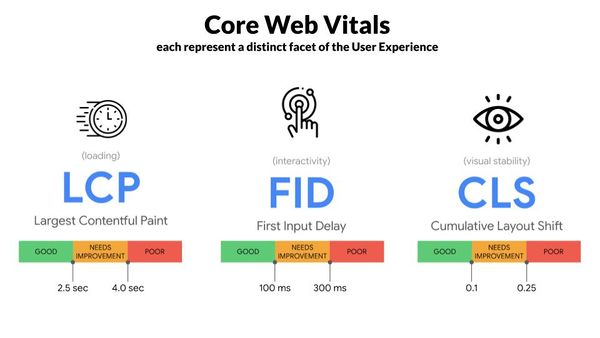
INP (Interaction to Next Paint) measures how responsive a page is to user interaction. It records the time from a click, tap or key press until the page responds visually.
Unlike the old FID metric, which only measured the first interaction, INP evaluates every interaction during the visit and reports the most representative value. That gives a fuller picture of the real user experience.
CLS (Cumulative Layout Shift) measures a page’s visual stability. It quantifies how much elements move unexpectedly while the page loads. Ever gone to click a button only for it to shift and take you somewhere else? That is exactly what CLS measures.
The metric matters especially on mobile, where the screen is smaller and unexpected shifts are far more frustrating.
Google offers several free tools for measuring your site’s Core Web Vitals. Each has its quirks, and it is worth using more than one for the full picture.
The most accessible tool for anyone. Enter a URL and you get a full report with LCP, INP and CLS scores for both mobile and desktop, plus specific recommendations for improving each metric. Available at: pagespeed.web.dev
If your site is verified in Search Console, you will find the “Core Web Vitals” report in the side menu. It shows real user data (not simulated) and groups URLs by status: good, needs improvement or poor.
Built into Chrome. Press F12, go to the Lighthouse tab and generate a report. It is particularly useful for developers because it gives detailed technical diagnostics and code suggestions.
A free Chrome extension that shows Core Web Vitals in real time as you browse any site. Ideal for quick checks without leaving the page.
Core Web Vitals matter more to Google rankings every year. Optimising them takes web development knowledge, performance analysis and experience fixing the specific problems of each platform.
At JRC Web we have spent years helping businesses improve their web performance metrics. As an SEO agency in Barcelona, we analyse where you stand, identify what is hurting your Core Web Vitals and carry out the optimisation work.
Alongside technical SEO, we offer professional web design where performance is a priority from day one of the project rather than a patch applied later.
Want to know how your site’s Core Web Vitals look? Get in touch and we will run a free analysis with tailored recommendations to improve your performance and rankings.
Improving LCP means optimising whatever has the biggest impact on how fast the main content loads. These are the most effective actions:
Images are usually the largest element on a page. Compress them without visible quality loss, using modern formats such as WebP or AVIF. Add lazy loading for images outside the initial viewport and use the srcset attribute to serve the right size for each device.
Quality hosting makes the difference. Consider a CDN so content is served from locations close to the user. Time to first byte (TTFB) should be under 800ms.
Non-critical CSS and JavaScript should load asynchronously or be deferred. Keep critical CSS minimal and inline it in the HTML. Use preconnect for important third-party resources.
Configure the right cache headers so static resources are not downloaded on every visit. Professional web design takes these technical details into account from the start of the project.
Improving INP means optimising how your site responds to interaction. The goal is for the browser to process events quickly without noticeable blocking.
Tasks that block the main thread for more than 50ms count as long tasks. Split them into smaller pieces using techniques such as setTimeout, requestIdleCallback or the newer scheduler.yield() API, so the browser can respond to interactions in between.
Every third-party script (analytics, live chat, social widgets, advertising) competes for resources. Work out which are genuinely needed and defer the rest. Consider loading chat widgets only when the visitor interacts.
Avoid running heavy code directly in event handlers. Use debounce or throttle for frequent events such as scroll or resize. Keep DOM manipulation inside handlers to a minimum.
An excessively large DOM slows every operation down. Keep the number of nodes under 1,500 where possible and remove hidden elements you do not need.
CLS improves mainly by reserving space for elements before they load, avoiding the unexpected shifts that frustrate visitors.
Always include the width and height attributes on img and video tags. Modern browsers use those dimensions to reserve the space before the resource loads. Alternatively, use the CSS aspect-ratio property to keep proportions.
Ad banners and social media embeds are frequent causes of high CLS. Define containers with fixed dimensions where these elements will load. Never insert ads above content that is already visible.
Use font-display: swap so text appears immediately in a system font while the custom one loads. Preload critical fonts with link rel=”preload”. Consider system fonts for body text.
If you need to add content dynamically (notifications, cookie banners), do it in a way that does not push existing content down. Use fixed positioning or reserve the space from the start of the load.
If your site is built on WordPress, there are specific things to know about optimising Core Web Vitals:
Not every WordPress theme is built for performance. Lightweight themes such as GeneratePress, Astra or Kadence usually score better than heavy visual builders. If you use Elementor or another page builder, avoid adding unnecessary widgets and sections.
Install a caching plugin such as WP Rocket, LiteSpeed Cache or W3 Total Cache. These can also minify CSS and JS, defer scripts and optimise the database. Pair it with an image optimisation plugin such as ShortPixel or Imagify.
Every plugin adds code that can affect performance. Audit your plugins regularly and remove the ones you do not actively use. Avoid plugins that load resources on every page when they are only needed on a few.
Hosting optimised for WordPress can make a very significant difference to your metrics. Specialised hosts include server-level caching, a built-in CDN and configurations already tuned for the CMS.
Yes, they have been an official Google ranking factor since 2021. Content is still the most important thing, but Core Web Vitals can be the difference between two pages with similar content. Google favours sites that offer a good user experience.
FID (First Input Delay) only measured the response time to the first interaction. INP (Interaction to Next Paint) measures every interaction during the visit and reports a representative value. Google replaced FID with INP in March 2024 because it measures real interactivity more completely.
At least once a month, and always after making significant changes to your site (a new design, extra plugins, a change of hosting). Search Console data updates roughly every 28 days, so be patient before you see the effect of your work.
PageSpeed Insights uses lab (simulated) data combined with field data when it is available. Search Console shows only real user (field) data. It is normal for them to differ. Field data is more representative of what your visitors actually experience.
Some basic improvements, yes: optimising images, removing unnecessary plugins or moving to faster hosting. The most effective optimisations, though, take web development knowledge. Without technical experience, it is worth having professionals implement the changes properly.
Yes. Google favours sites with a good user experience for its AI Overviews. A site that loads fast (good LCP), responds well to interaction (good INP) and does not jump around (good CLS) has a better chance of being chosen as a source in AI-generated answers. Optimising Core Web Vitals not only improves your organic rankings, it strengthens your presence across every Google result format.
Click to rate this post!
How useful did you find this content?
Click a star to rate it!
Average rating!0/ 5. Vote count0
No votes yet! Be the first to rate this post.
How much Google Ads costs: what you pay Google, what an agency charges to manage it and what budget you need for it to pay off.

Web design for freelancers in Barcelona: which pages you need, what it costs and how to get a professional, affordable website that wins clients.

What AI search optimisation (GEO) is and how to get ChatGPT, Gemini and Perplexity to recommend your company in Barcelona.