Digital advertising
How much Google Ads costs: spend, management fees and a realistic budget
How much Google Ads costs: what you pay Google, what an agency charges to manage it and what budget you need for it to pay off.

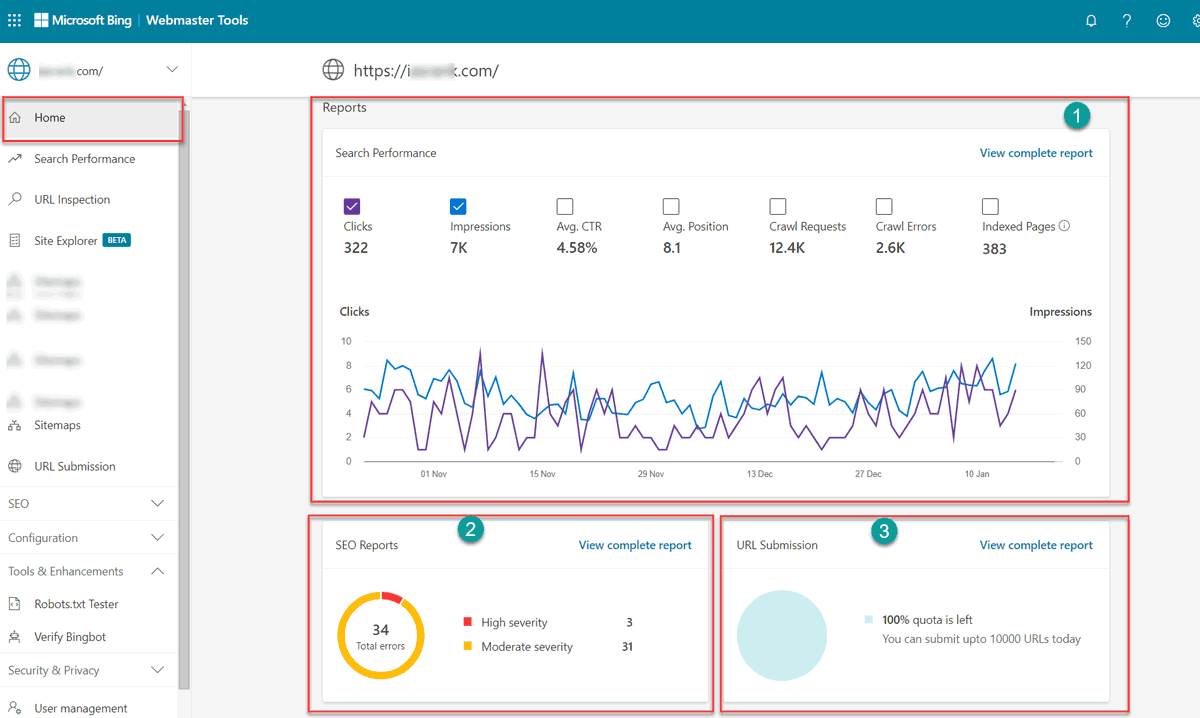
Bing Webmaster Tools is Microsoft’s free tool for managing your site’s presence in the Bing search engine. It lets you verify your site, submit sitemaps, use IndexNow to speed up indexing and diagnose the technical problems that hold your rankings back.
Google may dominate the market, but Bing drives more traffic than you think: it is the default engine in Microsoft Edge, it powers Copilot’s answers and it carries growing weight in Google’s own AI Overviews, which also crawl sources indexed in Bing. Ignoring Bing means leaving qualified traffic on the table.
In this guide we explain step by step how to set up Bing Webmaster Tools and get the most out of it, with practical tips and the common mistakes to avoid. It is based on the experience of our SEO agency in Barcelona, where we work on rankings across every search engine.
Bing Webmaster Tools (BWT) is Microsoft’s free dashboard for understanding how Bing discovers, crawls and indexes your site. It lets you verify ownership, submit sitemaps, push new URLs with IndexNow, diagnose crawl errors and see performance (impressions, clicks, CTR, positions).
Day to day I use it as a second barometer alongside GSC: when the two disagree, BWT usually uncovers robots.txt blocks or sitemap errors that went unnoticed.
What you will get out of this guide
Setting up and verifying your site with the right method for your stack (meta tag, file or DNS).
Building an indexing circuit: sitemap + IndexNow + manual submission when needed.
Reading the Performance report without bias and spotting opportunities.
Solving problems with URL Inspection and Backlinks.
Getting ready for the 2025 updates (Recommendations, extended data, integrations).
They share a philosophy, but each tool has its strengths. What works for me is combining them: GSC for overall volume and BWT for fine-grained diagnosis and IndexNow.
BWT offers a long history (useful for seasonality).
The metrics may not match GSC one to one: different indexes and sampling methods. When I am looking for trends, I watch the direction of change, not the exact figure.
IndexNow: notifies new and updated URLs directly to speed up discovery.
Recommendations (2025): a prioritised list of technical and content improvements.
Growing integrations with reporting tools (handy for executive dashboards).
Critical changes (launches, migrations): BWT + IndexNow for an immediate push.
Off-page audits: BWT Backlinks as a cross-check against other suites.
Query trends: GSC usually has more volume; BWT surfaces different queries.
Before touching the dashboard, prepare the ground:
Make sure HTTPS and your certificates are valid.
If you use a CDN (Cloudflare or similar), check it is not filtering Bing’s bot (bingbot).
In my experience, overly aggressive security rules cut off crawling and then show up as “blocked by other 4xx”.
A clear robots.txt
Canonical tags that are consistent (avoiding duplicates from parameters).
301 redirects with no chains, and clean 404s (not soft ones).

Create the property and verify your domain. Pick one method and stick with it:
Download the file from BWT and upload it to your root (/bingSiteAuth.xml).
Upside: fast, with no DNS changes.
Risk: deployments or your CDN can overwrite it.
Insert the meta tag they give you in <head>.
Simple on a CMS; watch out for builders that “clean up” HTML.
Recommended for serious or multi-environment projects.
Deployment-proof: my preferred option when several teams touch the code.
Saves time and copies your verification across. Ideal if GSC is already well set up.
A clean sitemap.xml speeds up discovery and cuts coverage errors.
A sitemap index for large sites (sitemap_index.xml).
Keep posts separate from pages and, where relevant, products.
Only include URLs that are 200, canonical and and indexable.
Declare them in A clear and upload them in BWT → Sitemaps.
Resubmit after big changes (migrations, large batches of content).
I check size, the ratio of new to updated URLs, and errors every week.
Non-indexable URLs: check meta robots and HTTP headers.
Old paths after a migration: update your generators and clear caches.
Slow response times: optimise your server or CDN.
My favourite shortcut for launches and fresh content.
You send a list of URLs (new, updated or deleted).
The search engine discovers them faster (it does not guarantee indexing, but it shortens the cycle).
Modern SEO plugins (Rank Math, AIOSEO and others) already include IndexNow.
On headless setups, add the API call to your publishing pipeline.
Prioritise new landing pages, categories and strategic content.
Do not flood it with irrelevant pages (filter by quality and 200 status).
My own flow combines: publish → IndexNow ping → updated sitemap.
Useful for unblocking key pages or testing whether something is blocked.
Critical pages just published.
Important technical fixes.
If it is not moving, check robots, canonicals, noindex, speed and your server logs.
Read trends; do not obsess over a single figure.
Impressions: your visibility potential.
CTR: optimise titles and metas; use emojis or brackets sparingly.
Average position: treat it as a compass, not an exact altimeter.
Segment by page to tell content problems from intent problems.
In practice, breaking it down by device surfaces mobile opportunities (short snippets, FAQs).
Pages in positions 5-15 with a relatively good CTR: small tweaks to the H1, H2 and opening paragraphs often unlock a jump.
BWT’s operating theatre.
Check how the bot sees the page and whether rendering depends on heavy JavaScript.
If resources are blocked, unblock them.
Check for noindex, nofollow, noarchive.
Define parameters in your CMS to avoid duplicates (listings, facets).
200 OK + correct canonical + indexable.
Included in the sitemap.
Submitted via IndexNow (if it is new).
Not blocked in robots.txt.
A look at the health of your link profile.
Prioritise new, relevant domains over batches from the same site.
Varied, natural anchor text.
My rule: if a link would not bring traffic, it probably does not help SEO either.
Bursts of exact-match anchors, obvious networks or irrelevant languages: be suspicious.
Only consider disavowing in cases of real risk; much of it is just noise.
BWT offers related query ideas and per-query performance.
Export the queries and group them by intent (informational, transactional, navigational).
Spot orphan topics with no dedicated page.
For each group: the goal, proposed H2s, FAQs and planned internal links.
In my flow, every brief is tied to a candidate URL and a target position.
Mastering crawling saves you surprises.
If your server is struggling, lower the crawl rate temporarily (carefully).
Block private areas, internal search results and obvious duplicates.
User-agent: *
Disallow: /wp-admin/
Allow: /wp-admin/admin-ajax.php
# Bloquea parámetros de tracking comunes
Disallow: /*?utm_*
Disallow: /*?ref=*
# Sitemaps
Sitemap: https://www.tudominio.com/sitemap_index.xml
Nothing destroys trust like a security warning.
Script injections, pharma hacks, hidden links: clean the code, update plugins and change credentials.
Request a new review in BWT once it is resolved.
Headers CSP, HSTS, X-Content-Type-Options.
Up-to-date software and automated backups.
Keep up so you do not lose your edge.
An actionable list ordered by impact and effort. Use it as a fortnightly backlog.
Better context for seasonality; ideal for seasonal content.
Simplified dashboards for stakeholders; AI executive summaries as support, not as a replacement.
A little from the trenches:
I found an inherited noindex in the category templates.
I removed the directive, updated the sitemap and notified via IndexNow.
Within two crawl cycles, coverage was back to normal.
Editorial calendar → batch IndexNow ping on publication.
Monitoring in Inspection and Performance to confirm visibility.
Validate after every deployment and automate status and header tests.
Different indexes and sampling; what matters is the trend.
If Bing gets worse while Google improves (or the other way round), check crawling and rendering compatibility.
Stable verification (DNS if possible)
Clean sitemaps, declared in robots.txt
IndexNow working in your CMS or pipeline
A fortnightly review of Performance and Recommendations
Inspection of critical URLs after changes
Backups and security patches up to date
Bing Webmaster Tools is a key piece of the puzzle, but not the only one. Combine it with other free SEO tools to cover the full technical analysis of your website.
Yes, Bing Webmaster Tools is completely free. All you need is a Microsoft account. It includes technical diagnostics, backlink analysis, keyword research and sitemap submission at no cost and with no usage limits. It covers most tactical SEO needs in Bing.
No, IndexNow does not guarantee indexing, but it shortens discovery time considerably. Instead of waiting for Bing’s bot to crawl your site on its own, IndexNow tells it directly that you have published or changed content. Bing then decides whether to index it based on quality and relevance.
It depends on your setup. DNS verification is the most robust and the one to choose for environments with multiple deployments or CDNs. For simple WordPress sites, the meta tag or the XML file in the server root is quicker to implement. All three methods are equally valid for Bing.
Only if you find genuinely toxic link patterns that may be hurting your rankings. Bing, like Google, can ignore most spam links by itself. Disavowing in bulk without good reason can backfire. Review it quarterly and act only on clear evidence of harmful links.
Because they are different search engines with different indexes, algorithms and user bases. Bing has less search volume than Google in Spain, so impression and click numbers will be lower. What matters is analysing trends within each platform separately rather than comparing absolute figures.
Yes, indirectly. Google crawls and indexes content from many sources, and having your site properly indexed in Bing with schema markup, structured content and sound technical data strengthens your overall presence in search. Bing also powers Microsoft Copilot, another AI visibility channel. Optimising for Bing and Google at the same time increases your chances of appearing in AI Overviews and AI-generated answers.
Click to rate this post!
How useful did you find this content?
Click a star to rate it!
Average rating!0/ 5. Vote count0
No votes yet! Be the first to rate this post.
How much Google Ads costs: what you pay Google, what an agency charges to manage it and what budget you need for it to pay off.

Web design for freelancers in Barcelona: which pages you need, what it costs and how to get a professional, affordable website that wins clients.

What AI search optimisation (GEO) is and how to get ChatGPT, Gemini and Perplexity to recommend your company in Barcelona.