Digital advertising
How much Google Ads costs: spend, management fees and a realistic budget
How much Google Ads costs: what you pay Google, what an agency charges to manage it and what budget you need for it to pay off.

Google Search Console (formerly Google Webmaster Tools) is a free Google service that lets website owners monitor, maintain and troubleshoot how their site appears in search results.
It is the only way to see real Google data about your website: not estimates or third-party data, but information straight from the search engine.
It is not mandatory, but it is highly recommended. It is free and gives you information you cannot get any other way. Any serious SEO strategy starts by setting up Search Console.
Before seeing the data, you need to verify that you own the site. Google offers several methods:
Go to search.google.com/search-console and sign in with your Google account.
You have two options:
Recommendation: use “Domain” if you have DNS access. It is more complete.
Available verification methods:
Search Console starts collecting data from verification onwards. Historical data can take a few days to appear in full.
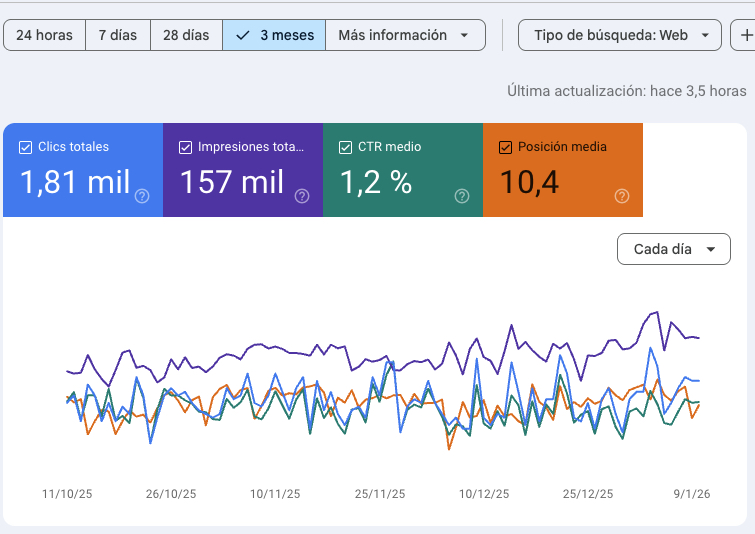
The Performance report is the most used. It shows how your site appears in Google search results.
Look for keywords with many impressions but few clicks: you have visibility but you are not convincing anyone. Improve the title and meta description to raise the CTR. Also identify pages in positions 5-15: with some optimisation they can move up to the top 3.

The Pages (formerly “Coverage”) shows the indexing status of your site: which pages Google has in its index and which it does not.
Review the important pages that are not indexed. If they should be, fix the problem (remove noindex, improve the content, fix robots.txt) and request indexing.
You can ask Google to crawl and index specific pages as a priority:
For large sites or frequent updates, it is better to keep a good, up-to-date sitemap. More in our guide on how to index your site on Google.
Search Console includes Page Experience reports that measure Core Web Vitals:
Search Console separates the reports by device. It is common for mobile to score worse because connections tend to be slower and devices less powerful.
Click on the issues to see which URLs are affected. Then use PageSpeed Insights for detailed diagnostics of each page and specific recommendations.
Google Search Console is essential for any SEO strategy. It is free, gives you data straight from Google and lets you find and fix problems before they hurt your rankings.
At JRC Web we use Search Console as a core tool to monitor and optimise our clients’ SEO. Real Google data lets us make decisions based on evidence, not assumptions.
As an SEO agency, we set up and analyse Search Console for every project, identifying opportunities and technical problems that could be holding back your rankings.
Want us to review your Search Console? Get in touch and we will give you an initial assessment with no commitment.
The Links shows which websites link to yours and how your internal linking looks:
Backlinks are an important link building factor. Analyse:
If you spot toxic links (from spam sites), you can use Google’s disavow tool, although only in extreme cases.
Search Console alerts you when it finds serious problems on your site:
Penalties applied by Google’s spam team when they find guideline violations:
If you have a manual action, you will see instructions to fix it and you can submit a reconsideration request.
Google warns you if it detects:
If you get an alert, act immediately. Security problems can get your site removed from results until they are resolved.
Both tools are free and complementary, but they measure different things:
Use both. Search Console tells you how people find you on Google. Analytics tells you what they do once they arrive. You can connect them to see combined data.
In Google Analytics 4, go to Admin → Product links → Search Console links and follow the steps to connect both properties.
Beyond the basic reports, Search Console offers advanced features:
Analyse any URL on your site in detail:
Request temporary removal of URLs from search results. Useful for sensitive content published by mistake.
Tell Google if you are migrating your site to a new domain, to make the transition easier.
Add users with different access levels (owner, full user, restricted user) for teams or agencies.
For advanced analysis, you can access the data through the API and build custom dashboards or integrations with other tools.
Click to rate this post!
How useful did you find this content?
Click a star to rate it!
Average rating!0/ 5. Vote count0
No votes yet! Be the first to rate this post.
How much Google Ads costs: what you pay Google, what an agency charges to manage it and what budget you need for it to pay off.

Web design for freelancers in Barcelona: which pages you need, what it costs and how to get a professional, affordable website that wins clients.

What AI search optimisation (GEO) is and how to get ChatGPT, Gemini and Perplexity to recommend your company in Barcelona.